I was sent this document by Celestron, to be distributed freely. Edhiker
.................................................
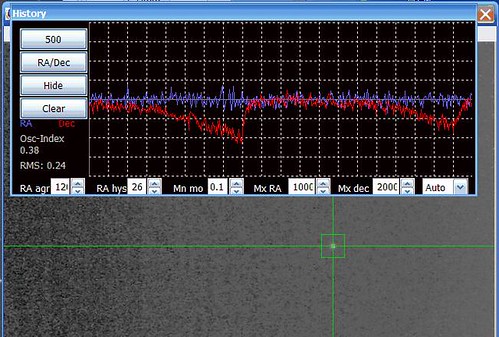
Mechanical backlash (as differentiated from gear backlash) is caused by static friction. Typically on the order of a few arcseconds, mechanical backlash is only seen when making small position adjustments in the same direction with a complete stop between each adjustment. This situation occurs frequently during pulse guiding. Mechanical backlash can make it appear that your mount is “stuck” and unable to guide in Declination. (It doesn’t apply to RA because that axis doesn’t stop moving between guiding pulses.) This document describes methods to help combat mechanical backlash while pulse guiding
Tip #1
The mechanical backlash can be increased or decreased dramatically (a factor of 2 or more) with a gravitational assist. For example, suppose the star in your image is drifting to the north in DEC. If you hang a small weight on one end of the tube so that it tends to pull north, this will keep the gears pre-tensioned in that direction. Thus the mechanical backlash in that direction will be less. Of course, mechanical backlash in the other direction will be worse by the same amount, but since changing direction also requires overcoming the gear backlash, which is many times larger, it won’t be noticed. Don’t get carried away though, too much weight can cause serious overshoot of the DEC axis when it first starts to slide. Start small and work upwards.
If this trick is not possible (as is the case in a remote observatory) then you must make sure your tube is well balanced in DEC. Don't let it become heavy in the direction of North or South. Rebalance it after you change camera equipment. The “Set Mount Position” function in the Utilities menu can be used to accomplish this without losing your alignment.
Tip #2:
Auto guiding software has multiple parameters that can help you address mechanical backlash. It is different in every package. One such parameter allows you to set the maximum pulse duration. This must be long enough to overcome the mechanical backlash on your system. If you can't control maximum duration, try increasing the AG rate setting with you hand control. Another setting to look for is the one that controls the minimum displacement before acting. For example, say you have a mount with a mechanical backlash of 3 arcSeconds. If you set the software to require a minimum of 3.5 arcseconds before reacting it will be sure to send a pulse long enough to overcome the mechanical backlash plus a little bit more. Of course, the net displacement of the mount, after accounting for the mechanical backlash, will be only 0.5 arcSeconds, and the drift error will still be 3.0 seconds. But once error rises to 3.5 arcSeconds, the software will again send a pulse of 3.5 arcSeconds, and you get another net gain of 0.5 arcSeconds. Thus, the mount will move in tiny steps of 0.5 arcSeconds, but always 3.0 arcSeconds behind. As long as you start your exposure after first correction from the AG software, the star will not drift during your exposure by more than 0.5 arcSeconds.
FINAL NOTE:
Mechanical backlash has been around for a long time. Using tips like the ones I described above, successful imagers have worked around mechanical backlash for many years.
Ref: mechanical backlash5.doc
Tuesday, October 25, 2011
PHD dec drift


Subscribe to:
Posts (Atom)